Hotel Lobby AI Video Generator
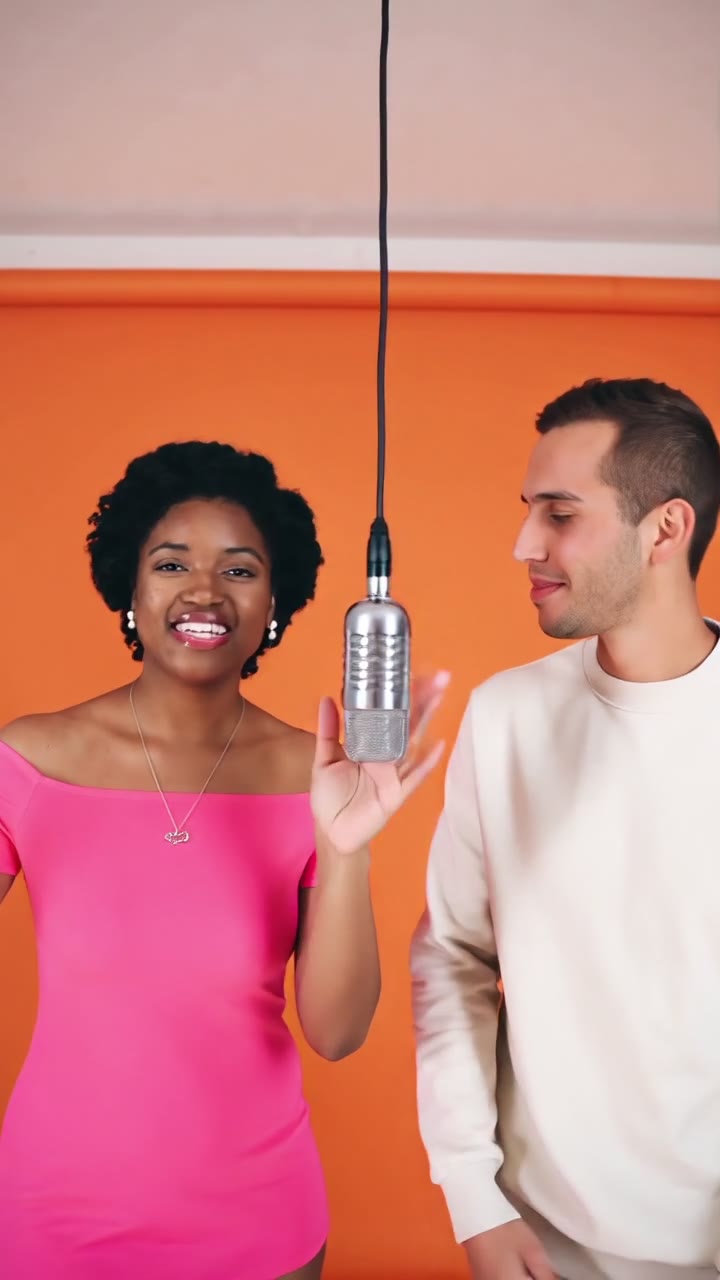
Turn two photos into the viral Hotel Lobby duo: an orange booth, one hanging microphone and two performers trading verses.
Quick answers4 questions
- What does the Hotel Lobby effect make?
- Make the viral Hotel Lobby AI video from two photos. Put you and a friend in the orange booth with one hanging mic, trading bars. Vertical 9:16, 15 seconds.
- How much does a Hotel Lobby video cost?
- 90 credits per 15-second video. Credit packs start at $14.99 for 150 credits and don't expire. If a render fails, the credits go back automatically.
- What do I need to upload?
- Two photos, one per person. Front-facing and well lit works best.
- How long is the video, and how long does it take?
- Every video is 15 seconds, 9:16, saved as an MP4. Rendering usually takes about 1–2 minutes.
✓Stays consistent
- Both faces & identities
- Orange set & hanging mic
- Left / right placement
- Vertical 9:16 framing
~Varies each render
- Outfits & small details
- Gestures and moves
- Camera drift
Create your video
Photo 1 becomes the left performer, photo 2 the right.
Changes mood & expressions, not faces or the setting.
Sample output
What to expect
✓Stays consistent
- Both faces & identities
- Orange set & hanging mic
- Left / right placement
- Vertical 9:16 framing
~Varies each render
- Outfits & small details
- Gestures and moves
- Camera drift
Sample results: photo in, video out
Real renders from this effect. Slots marked PLACEHOLDER are waiting for consented test renders.
Make a Hotel Lobby AI video from two photos
The Hotel Lobby AI video generator turns two photos into a short vertical duo rap clip. Upload one photo for the left performer and one for the right. HiVideoStudio places both people side by side in a bright orange studio with one silver microphone hanging between them, then animates a back-and-forth performance. The left performer raps first while the right one nods along. Then they switch, and the right performer leans into the mic.
It works for friends, couples, coworkers, siblings, and pets. You do not need a source video, a motion preset, or editing skills. The orange set, the shared mic, the waist-up framing, and the turn-taking are built in. You can add one optional line of direction, such as outfits, energy level, or a reaction. Every clip is 15 seconds and 9:16, so it fits TikTok, Reels, and Shorts without cropping. Faces and the orange set stay consistent from render to render. Clothing and small gestures can vary.
Where this clip fits
Format, photos, and credits for this effect.
TikTok, Reels, and Shorts
The render is a 15-second MP4 at 9:16, with an AI-generated background beat. It is not the original Hotel Lobby song. That frame is what TikTok, Reels, and Shorts use full screen.
Two photos
Upload two files, JPG, PNG, or WEBP, up to 10 MB each. Photo 1 is the left performer and photo 2 is the right. One person or pet per photo, face visible.
90 credits
One 15-second video costs 90 credits, shown before you generate. The first-frame still is free and watermarked.
If the render fails
Credits are taken when the render starts. If it fails, times out, or is moderated, they are refunded automatically. The MP4 is saved to your Library.
How to make a Hotel Lobby video in 3 steps
- 01
Upload two photos
Add Photo 1 for the left performer and Photo 2 for the right. Use one person or pet per photo, with the face clearly visible.
- 02
Pick length and quality
Check the free watermarked still preview of your duo. Every video is 15 seconds; there are no length options to pick.
- 03
Generate and download
Rendering usually takes 1–3 minutes. Download the 9:16 MP4 and post it. If the render fails or is moderated, your credits are refunded automatically.
Which photos work best
Works well
- One person or pet per photo
- Face clearly visible, front-facing
- Even, bright lighting
- Similar waist-up framing in both photos
Avoid
- Group shots or crowded backgrounds
- Sunglasses, masks or hands covering the face
- Blurry, tiny or heavily filtered images
- Photos of anyone who has not agreed
How much does it cost? Is it free?
One 15-second video costs 90 credits. The first-frame still preview is free and watermarked. Credits are refunded automatically if a render fails or is moderated.
| Option | Credits | Best for |
|---|---|---|
| First-frame preview | Free | Checking your photo (watermarked still) |
| 15s · 720p | 90 | TikTok, Reels and Shorts |
1 video = 15s. One price per video, no subscription needed. See all packs.
Specs
- Output
- MP4 video
- Aspect ratio
- 9:16 vertical
- Lengths
- 15 seconds
- Resolutions
- 720p, vertical 9:16
- Audio
- AI-generated background beat, not the original song
- Inputs
- 2 photos (left and right performer), JPG, PNG or WEBP, plus an optional text direction
- Max file size
- 10 MB per photo
- Typical generation time
- Usually 1–3 minutes
- Watermark policy
- The free first-frame preview is watermarked. Paid renders download as a clean MP4.
Can I post it on TikTok, Reels or Shorts?
- Consent: only upload photos of people who have agreed to appear in the video, and ask before you post it.
- Minors: do not upload photos of anyone under 18 without a parent or guardian's consent.
- AI label: mark the clip as AI-generated using your platform's AI-content label when you post.
- No endorsement: do not present the clip as real footage, or as made or approved by any artist, label or show.
Where the Hotel Lobby trend came from
The format is based on a 2022 performance of the song "Hotel Lobby" on a YouTube music series, filmed on a plain orange set with the two performers sharing one hanging microphone. In September 2026, creators on TikTok and X began recreating the shot with AI. They swapped in cats, friends, couples and fictional duos, and the format spread quickly.
Background and guides
Related pages
- Hotel Lobby trend: The guide matches this two-photo orange-set effect.
- AI Rap Duo: Category page for that search. Generate on this effect: two photos, orange booth, 90 credits for 15 seconds.
- Face Swap: One to three faces plus a reference video, 150 credits, 15 seconds at 768P.
FAQ
What is the Hotel Lobby AI effect?
It places two people or pets from two photos into a vertical duo rap clip on a bright orange set with one hanging microphone. The left performer raps first, then they switch. It is an original AI generation, not the original footage or song.
What photos should I upload?
Two clear, front-facing photos with one person or pet in each. Waist-up shots with good lighting work best. Photo 1 becomes the left performer and Photo 2 the right.
Can I use a photo of my pet?
Yes. Cats and dogs work well when the face is sharp and looking toward the camera. Expect paws and body poses to vary more than human gestures.
How long is the video and does it have sound?
Every video is 15 seconds, vertical 9:16, with an AI-generated background beat. It is not the original Hotel Lobby track. The sample on this page is a separate 4-second file.
How much does it cost? Is it free?
The first-frame still preview is free and watermarked. A 15-second video costs 90 credits. Failed or moderated renders are refunded automatically.
What happens if a render fails?
Credits are deducted when the render starts. They are refunded automatically if the generation fails or is moderated. You do not need to contact support.
Why do outfits change between renders?
Each render is generated fresh. Faces and the orange set are held most consistent, while clothing and small gestures can vary. To steer outfits, describe them in the optional direction field.
Can I use photos of celebrities or strangers?
No. Only upload photos of people who have agreed to it. Do not use the effect to impersonate anyone, mislead viewers, or suggest endorsement.